How Google Password Alert Works Against Phishing
Phishing remains the primary vector for credential theft. Attackers do not need complex code to break your security; they simply trick you into handing over the keys. Google’s Password Alert is an extension designed to break this cycle by acting as a digital tripwire for your Chrome browser.
The Mechanics of Protection
When you install Password Alert, the extension creates a salted hash of your Google account password. Think of this hash as a unique fingerprint of your password rather than the password itself. The extension never sends your actual credentials to Google servers.
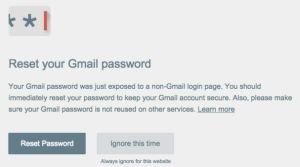
As you browse, the extension monitors the forms you interact with. If you enter your Google password on a site that isn’t an official Google login page, the tool performs a local comparison. If the fingerprint of what you typed matches your saved hash, it triggers an immediate warning.
Why This Matters for Your Workflow
Human error is the weakest link in any security chain. You might be tired, distracted, or simply moving too fast through your inbox. Password Alert acts as a secondary cognitive check. It forces a pause, making you verify the site’s URL before you hit the submit button.
Real-World Technical Limitations
While the extension adds a layer of safety, it is not a silver bullet for your digital security. You must understand where it stops being effective to avoid a false sense of invulnerability.
- Browser Lock-in: It functions exclusively within the Google Chrome environment. If you switch to Firefox, Safari, or mobile browsers, your protection vanishes.
- Credential Scope: The tool only guards your Google account password. It remains blind if you reuse that same password on third-party services like banking or retail sites.
- Page Context Blindness: The extension detects the input field, not necessarily the site’s intent. If an attacker hosts a clever overlay on a legitimate-looking but spoofed page, the extension may not always catch the nuances of the deception.
Common Mistakes to Avoid
Many users treat extensions as a substitute for secure habits. Do not fall into this trap. A major mistake is assuming that because you have an alert system, you can safely click on suspicious email links. Treat every unsolicited request for your credentials with skepticism regardless of whether the extension is active.
Another error is password reuse. If you use your Google password for your Netflix or LinkedIn accounts, Password Alert cannot protect those accounts. If one of those services suffers a data breach, your Google account could still be compromised through credential stuffing.
Actionable Security Best Practices
Relying on a single extension is a fragile strategy. Follow these steps to build a more robust defense:
- Adopt a Password Manager: Use a tool like Bitwarden or 1Password. These managers generate long, unique passwords for every site, meaning a breach in one location does not impact your primary Google account.
- Enable Multi-Factor Authentication (MFA): Even if your password is stolen, MFA acts as a second lock. An attacker cannot access your account without the physical token or code from your secondary device.
- Verify URLs Manually: Before entering any sensitive information, inspect the browser address bar. Ensure the domain name is exactly as expected—for example, google.com, not google-support.com.
Password Alert is a useful utility, but treat it as a safety net, not the entire structure. Combine it with strong hygiene and MFA to stay ahead of sophisticated phishing attempts.
Content updated on 2026-08-23