
Ransomware: The New Reality of Digital Extortion
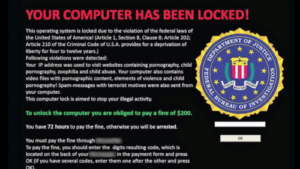
Ransomware has moved far beyond simple screen-locking scripts. Today, it functions as a highly professionalized ‘Ransomware-as-a-Service’ (RaaS) industry. Think of it like a professional burglar who doesn’t just steal your valuables, but replaces your front door locks and demands a digital ransom for the new keys. If you haven’t prepared a spare entrance, you are effectively locked out of your own life.
Statistics show that ransomware attacks occur every 11 seconds globally. Modern threat actors now perform ‘double extortion.’ They don’t just encrypt your files; they exfiltrate sensitive data first. Even if you restore your system from backups, they threaten to leak your private information publicly unless you pay. You are no longer just dealing with a locked computer; you are facing a corporate-style blackmail operation.
The Anatomy of a Modern Attack
Modern infections prioritize stealth. They enter silently, often lingering in your network for weeks before triggering the encryption process. This is known as dwell time. By the time you see the ransom note, the attackers have likely already mapped your backup drives and administrative credentials.
- Initial Access: Attackers often buy credentials on the dark web. They gain entry through weak Remote Desktop Protocol (RDP) configurations or unpatched VPN gateways.
- Credential Harvesting: Once inside, they dump your password memory to gain administrative rights.
- Shadow Copy Deletion: The first thing most ransomware does is delete your Windows ‘Shadow Copies,’ which are local temporary backups.
- Encryption Latency: The malware often encrypts files slowly to avoid triggering CPU performance spikes that would alert you.
The 3-2-1 Backup Strategy: Why Standard Isn’t Enough
The 3-2-1 rule is the industry standard for a reason, but its execution is where most people fail. Simply having a backup is not enough if that backup is ‘live.’ If your external hard drive is plugged in 24/7, your computer sees it as another folder. The ransomware will see it too.
- 3 Copies: One primary production copy and two distinct backup sets.
- 2 Media Types: Use a combination of local high-speed SSDs and reliable cloud services.
- 1 Offsite/Offline: This is non-negotiable. One backup must be physically air-gapped.
Think of your offsite backup like a bank vault. If the bank is robbed, your money is safe because the vault is in a different location with restricted access. If your cloud backup allows for ‘versioning,’ ensure it is configured to prevent instant deletion of older files during an infection.
Human Error: The Weakest Link in the Chain
Technical tools are useful, but human behavior is the primary vector for ransomware entry. Most attacks rely on social engineering to bypass your security stack. You need to treat your digital identity with the same level of paranoia as your financial records.
- Restrict Privileges: Create a ‘standard’ user account for daily web browsing and email. Only use your ‘administrator’ account when installing software. This prevents malware from gaining deep system access.
- Filter Attachments: Treat any unsolicited email attachment as a potential bomb. Even documents from known contacts can be malicious if their account was compromised.
- Enable MFA Everywhere: Multi-Factor Authentication acts as a seatbelt. It won’t stop a crash, but it significantly reduces the damage if your password is stolen.
Mistakes That Cost Thousands
The same costly mistakes come up again and again after an attack. Avoid these traps to keep your data secure.
Do not rely solely on automated sync tools. If a sync tool replicates an encrypted file to the cloud, you are effectively backing up the encrypted version over your healthy data. You must have a ‘version history’ feature enabled on all cloud storage to revert to the pre-encryption state.
Furthermore, stop treating antivirus software as a silver bullet. Modern ransomware is polymorphic, meaning it changes its digital signature to bypass traditional detection methods. Your antivirus might miss the initial infection. Your offline backup is your only guarantee of recovery when detection fails.
Your Security Action Plan
Start today by auditing your current state. Run a ‘restore test’ on your most critical files. A backup you cannot restore is not a backup; it is just a digital pile of junk. Test the process once a month to ensure your recovery plan is functional and your passwords to your backup services are known and accessible.
Finally, keep your operating system and firmware updated. Vulnerability patching is the equivalent of locking your windows before you leave the house. Most ransomware exploits vulnerabilities that have had patches available for months. By staying updated, you force attackers to spend time and resources elsewhere, making you a less attractive target.